
Digital platforms rely heavily on User Experience (UX), which is not just a buzzword. When it comes to user engagement, a well-designed UX is crucial for any website, mobile app, or e-commerce store. Is there a way to gauge the level of UX proficiency on your platform? Access the UX audit, which is a structured process to identify usability issues and suggest ways to enhance it. An interesting and practical UX audit checklist can help your business stand out in the competitive digital landscape. Let’s dive in!
Why Does UX Matter?
Imagine you’re going to an online store and buying a luxury item. It’s a slow, unreliable website to navigate and the checkout process just plain frustrating. Would you return? Most likely not. A poor user experience can result in lost customers, negative reviews, and lower revenue. Why?


The following are some convincing arguments for investing in UX:
Improved Retention: Users are more likely to return if they find your platform easy to use.
Higher Conversions: A seamless UX guides users to take desired actions, boosting sales.
Competitive Advantage: A well-designed interface sets your brand apart from competitors.
Now we know that why UX is important, let’s explore the ultimate checklist to audit your platform.
The UX Audit Checklist


1. Understand Your Users
A UX audit starts with a deep understanding of your users. Who are they? What are their needs and pain points?
- Define Personas: Create detailed profiles of your target audience.
- User Journey Mapping: Trace the steps users take on your platform.
- Feedback Analysis: Gather insights from user surveys, reviews, and support tickets.
Example: A premium e-commerce brand discovered that their luxury clientele valued fast checkouts and personalized recommendations. This insight reshaped their UX strategy.
2. Navigation and Information Architecture
Navigation is the backbone of any digital platform. If users can’t find what they’re looking for, they’ll leave.
- Is Navigation Intuitive? Ensure menus and links are clear and logically organized.
- Use Breadcrumbs: Help users keep track of their journey within your site.
- Search Functionality: Include a powerful search tool with filters and auto-suggestions.
Tip: Test your navigation with first-time users to identify potential roadblocks.
3. Visual Design and Branding
First impressions matter, and your platform’s design sets the tone for user trust and engagement.
- Consistency is Key: Use a unified color palette, typography, and design elements.
- Visual Hierarchy: Highlight key actions and content through size, color, and placement.
- Responsive Design: Ensure your platform looks stunning on all devices.
Example: A luxury brand revamped their design by incorporating high-quality visuals and minimalist layouts, leading to a 30% increase in user retention.
Want to learn more about creating a website that adapts seamlessly across devices? Check out our detailed blog on Responsive Web Design for tips and insights into enhancing mobile and desktop experiences.
4. Loading Speed and Performance
Did you know that a 1-second delay in page load time can reduce conversions by 7%? Speed is crucial.
- Optimize Media: Compress images and videos without compromising quality.
- Use Caching: Store temporary data to reduce loading time.
- Run Speed Tests: Tools like Google PageSpeed Insights provide actionable suggestions.
Pro Tip: Prioritize optimizing your homepage and checkout pages, as they’re high-impact areas.
5. Mobile Responsiveness
With mobile devices accounting for over half of web traffic, responsive design isn’t optional.
- Check Touch Targets: Buttons and links should be easy to tap.
- Test Across Devices: Ensure compatibility on various screen sizes.
- Simplify Navigation: Use collapsible menus and sticky headers for better usability.
Example: An e-commerce platform streamlined their mobile interface, leading to a 40% increase in mobile sales.
6. Content Clarity
Your content should inform, engage, and guide users seamlessly.
- Readable Text: Use legible fonts and sufficient contrast.
- Engaging Copy: Write concise and compelling headlines and descriptions.
- Use Multimedia: Incorporate images, videos, and infographics to enrich user experience.
Pro Tip: Break long paragraphs into bite-sized chunks for easier readability.
7. Forms and Call-to-Actions (CTAs)
Forms and CTAs are critical touchpoints where users convert into leads or customers.
- Simplify Forms: Minimize required fields and use autofill options.
- Effective CTAs: Use action-oriented language like “Get Started” or “Shop Now.”
- Error Handling: Provide clear error messages with suggestions to fix issues.
Example: A luxury service provider revamped their form design, reducing drop-offs by 25%.
8. Accessibility Compliance
An inclusive UX ensures that your platform caters to users with diverse abilities.
- Alt Text for Images: Describe visuals for screen readers.
- Keyboard Navigation: Enable users to navigate without a mouse.
- Color Contrast: Ensure text is readable against background colors.
Pro Tip: Use tools like WAVE or Axe to check for accessibility compliance
9. Analytics and Heatmaps
Data is your best friend when evaluating user behavior.
- Use Analytics Tools: Google Analytics can reveal drop-off points and popular pages.
- Implement Heatmaps: Tools like Hotjar show where users click, scroll, or spend time.
- Session Recordings: Watch real user interactions to uncover hidden issues.
Example: A brand discovered through heatmaps that users ignored their top menu. A redesign boosted engagement by 20%.
10. Conduct Usability Testing
Nothing beats real user feedback.
- Moderated Testing: Observe users as they interact with your platform.
- Surveys and Polls: Ask for feedback directly on your site.
- A/B Testing: Experiment with different designs to see what works best.
Pro Tip: Regular usability testing ensures your platform evolves with user expectations.
Putting It All Together

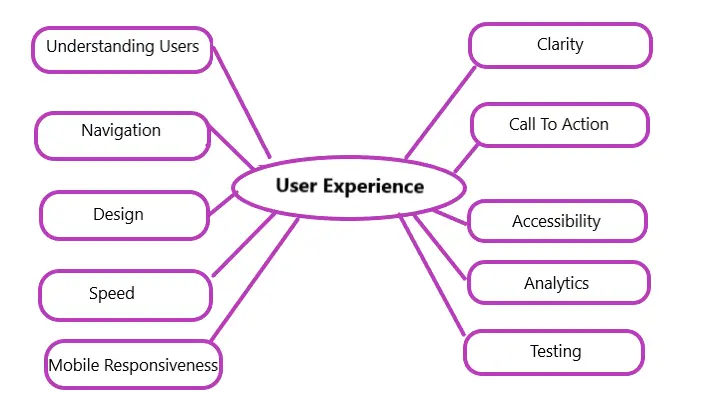
A UX audit is an ongoing process, not a one-time task. Use this checklist to identify and prioritize areas for improvement. Collaborate with your design and development teams to implement changes and measure their impact.
By focusing on user-centric design, your business can:
- Delight users with seamless experiences.
- Build trust and loyalty.
- Drive conversions and growth.
Ready to transform your platform with a stellar UX audit? Start implementing these tips today and watch your business thrive. Need expert guidance? Contact Pixtar for a personalized UX consultation tailored to your brand’s needs. Let’s make your platform unforgettable!